Client Communication with the Edge API
Introduction
For robust and secure operation our services run on a dedicated edge device on the shop floor. Other devices, so-called “clients” communicate with the edge device over a local area network (LAN). A client could be a PLC, robot controller, HMI or other enterprise IT systems such as MES or PDV. The edge API describes a series of functions, a client can execute on the edge device by making requests over the network. How to wire and setup networking on the edge device is described in this subsection.
Prototypical Client Application
A client application will typically involve the following four stages:
1. Configuration
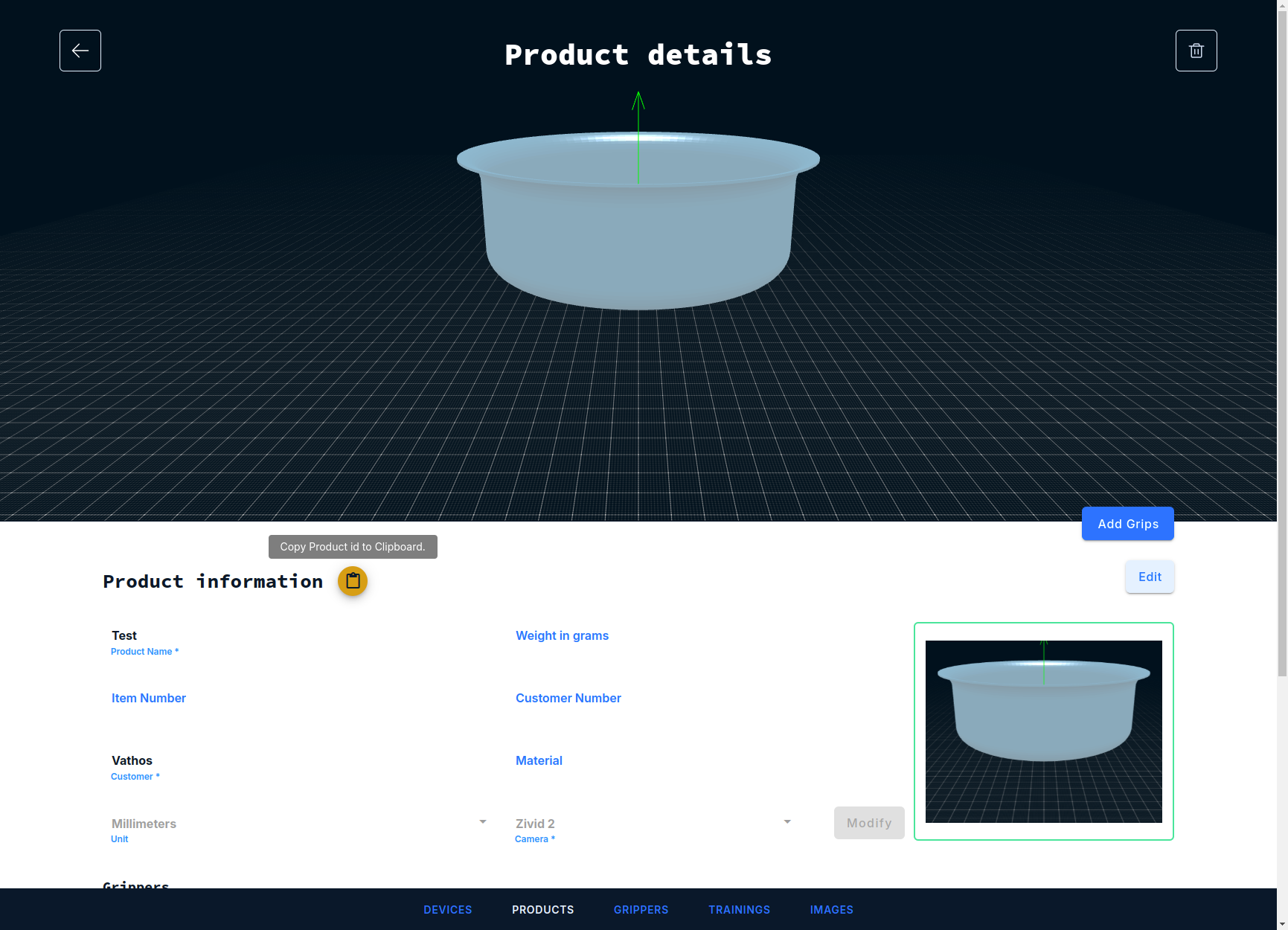
Most service offered by the API are trained to process one and only one specific product/SKU. The vision system needs to be told for which product it should load the product-specific result of trainng and other parameter values. This is achieved by calling the API function load_configuration which takes two arguments. The first argument is a unique product identifier, which can be obtained by clicking on the icon next to the product name in the main web frontend.
The second argument specifies a “workflow”, which is an identifier of the service for which the configuration procedure was intended. This is necessary when an application needs to run inference with multiple services to solve a particular task at hand. The workflow identifier then routes the configuration command to the right service.
All inference services act like state machines, meaning they will remain in their state under any circumstances, even after a reboot of the system, unless load_configuration is called with different arguments.
2. Image capture
Image acquisition is started by calling the function trigger. Again, the first argument specifies the workflow and thus determines which of the inference services will be called once image acquisition is complete. The second argument is a Boolean which controls the maximal blocking time of the function call. If set to true, the function will only return when the image acquisition is fully completed and it is safe to move the robot. If set to false, the function will return immediatly after image acquisition has started (but not until the evaluation is complete, see below). The latter has merits in applications where the camera is static and the robot is operating at a sufficient distance from the field of view while the capture is in progress.
3. Image processing (“inference”)
There is no need to issue another function call to start inference itself. Processing will start by the selected workflow once an image has been recorded. It is important to understand that inference runs in an asynchronous fashion as illustrated in the figure below.
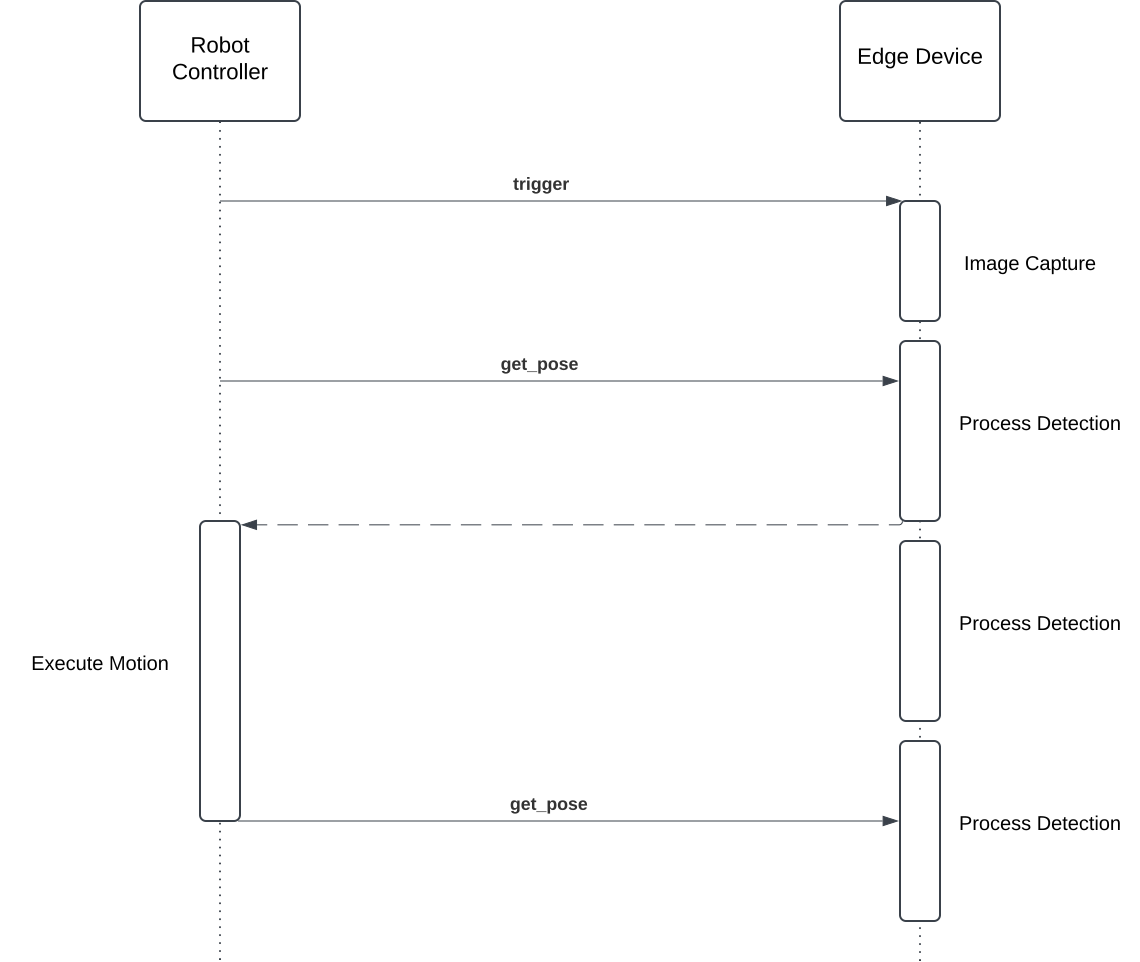
Image capture as well as processing of a number of initial detections (obtained simultaneously for the entire image with low latency) are shown as vertical rectangles on the timeline of the edge device. Processing stops after a pre-defined maximal time which is set according to the available compute resources (in particular, CPU and memory) on the edge device. Limiting processing time is important to avoid drowning the device by inference requests sent at an excessive frequency.
4. Communication of results
An attempt to retrieve pick poses can be initiated at any time by calling the function get_pose, even while inference is still in progress. Again, the request needs to be directed to a specific service by providing the workflow argument. There are further arguments described in more detail in the service-specific documentations which configure the robot-specific representation in which a pose is returned. The last argument is a real number which specifies the maximum time in second the function should wait for a processing result to be available. Note that this is a maximum wait time; as shown in above UML sequence diagram above, the function returns as soon as the inference engine delivers a new result. The main advantage of an such an asynchronous approach also becomes obvious looking at the diagram: unless a new image is taken per pick, the robot can manipulate the first object, while processing of further detections continues in parallel and the next result is available without further wait time once the robot has executed its place motion.
Translation Services
The precise implementation of load_configuration, trigger, or get_pose depends on the nature of the calling client: a mobile app would use different means of communication than a PLC or a dedicated robot controller. We let each device speak their own language by providing what we call translation or connector services. These translation service are easily installed through our main web interface.
They receive messages in a dedicated protocol and convert it, directly or indirectly, into an HTTP request which is the natural way to interact with the API. A hierarchy of supported protocols is shown in the figure below.
flowchart BT;
    B[XML-RPC]-->C[HTTP];
    A[Socket Messaging]-->B;
    D[OPC-UA]-->C
    E[KUKA KRL]-->B;
The implementation of the client for is responsibility of the system integrator. The detailed protocol descriptions are geared towards implementors willing to develop a client application from scratch. For a variety of platforms, we do, however, provide boiler plate code and basic instructions to get up and running.
Error Diagnosis
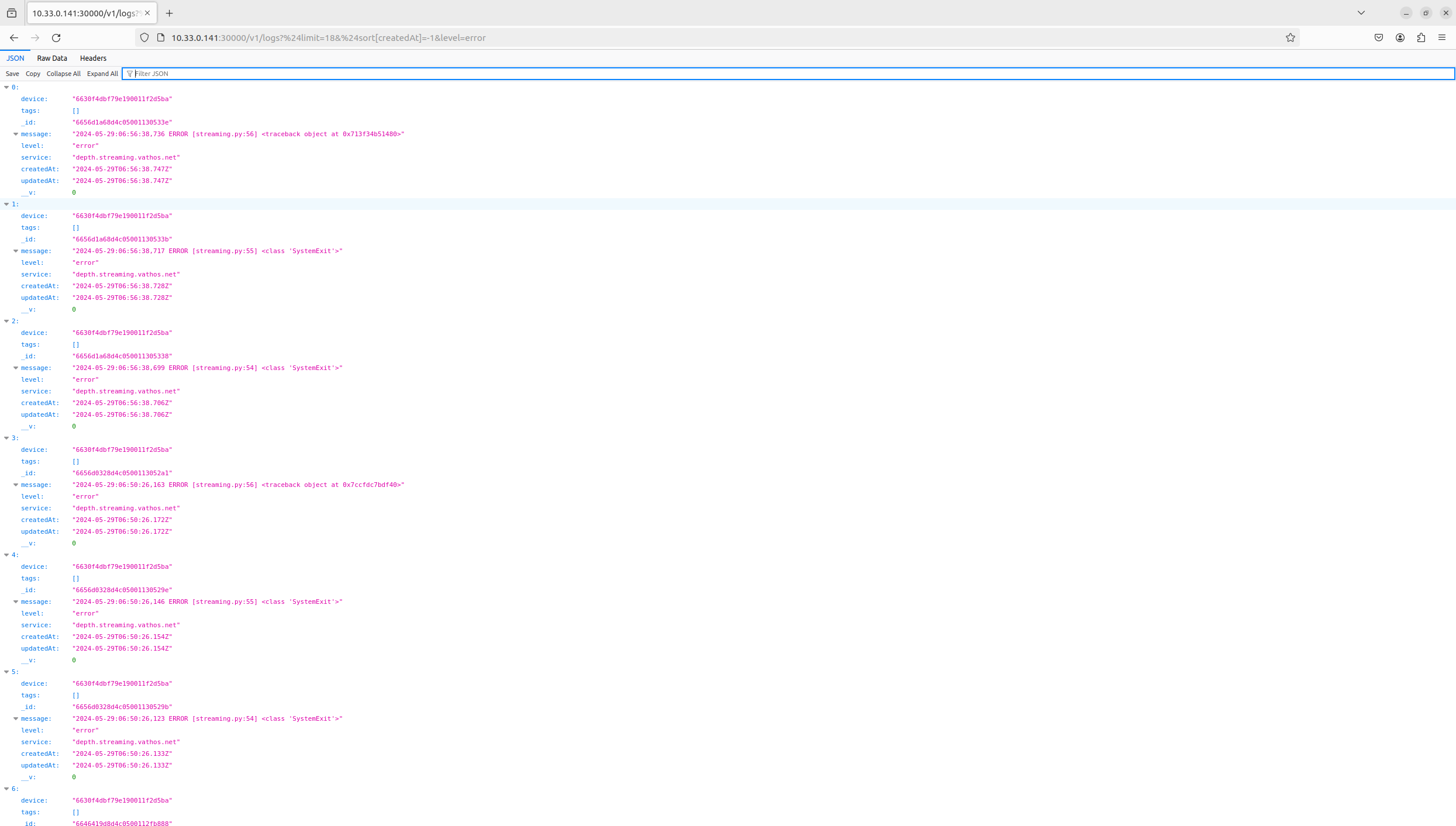
All messages logged in any of our services are stored in a database and made accessible through a REST API. For example, the latest error messages are obtained through the following HTTP request
GET http://${EDGE_DEVICE_IP}:30000/v1/logs?%24limit=18&%24sort%5BcreatedAt%5D=-1&level=error
or by simply visiting above URL with a web browser.
Monitoring
All of our edge devices are outfitted with a Promtheus monitoring stack which collects performance metrics from all of our services, aggregates and makes them available through its own API. The Prometheus API server is exposed on port 30002.
Instant queries
One can retrieve the value of a metric foo at a time instance t given as a Unix epoch in seconds with the following request:
GET http://${EDGE_DEVICE_IP}:30002/api/v1/query?query=foo&time=${t}
The responses looks something like this:
{
  "status": "success",
  "resultType": "vector",
  "data": {
    "resultType": "vector",
    "result": [
      {
        "value": [
          1734153463,
          "24562"
        ]
      }
    ]
  }
}
The property status indicates whether the query was successful or not. The key data.result.value points to a vector of length 2 whose first item just echoes the requested evaluation time and whose second item contains the desired metric value as a string.
Range queries
One can retrieve the value of a metric foo between some start time t0 and some end time t1 (both again given as UNIX timestamps in seconds) in seconds with the following request:
GET http://${EDGE_DEVICE_IP}:30002/api/v1/query_range?query=foo&start=${t0}&end=${t1}&step=1
The query parameter step specifies the desired time interval between two samples. Note that Prometheus collects metrics with some internal sampling frequency which may be much larger than the minimum step size of 1 second. The result has a similar form as that of the instance query with the difference that values are stored under the key data.result.values as list of lists (a matrix):
{
  "status": "success",
  "data": {
    "resultType": "matrix",
    "result": [
      {
        "values": [
          [
            1734149863,
            "24472"
          ],
          [
            1734149923,
            "24477"
          ]
        ]
      }
    ]
  }
}
An in-depth description of the API can be found on the Prometheus website.
Common metrics
The following metrics will be exposed on all of our object recognition services for pick & place applications.
| Name | Description |
|---|---|
number_of_picks_total | Number of retrieved detections since device start. |
collisionfree_detections_per_image | Number of pickable objects per image. |
total_detections_per_image | Number of all detected objects including those rejected by collision avoidance/verification. |
detection_rate | The ratio of collisionfree_detections_per_image and total_detections_per_image. |
pick_failures | Number of consecutive failurs to retrieve a detection. Will be reset to 0 as soon as the next valid detection is retrieved. |
detection_cycle_time | Time for image evaluation. Measurement starts upon completion of image acquisition and ends when the processing of the first detection associated with the image becomes available. |
detection_fitness | Quality measure of detections retrieved by the client, where 0.0 is the worst, and 1.0 is the best score. |
cluster:node_cpu:sum_rate5m | Number of utilized CPUs. |
node_memory_MemAvailable_bytes | Available main memory in bytes. |
Note that this list may not include service-specific metrics. These are described in the part of the documentation explaining how to run inference with the specific service.
Common API Functions Reference
patch_configuration
patch_configuration(config_id, key, value)
Overwrites a (nested) value in a configuration.
The configurations for a product, device, and service can be obtained through calls against accompanying REST API.
Arguments
config_id(string): Database id of the configuration to patch.key(string): Path of the property in the configuration object to patch.value: Desired new value.
patch_configuration_by_product
patch_configuration_by_product(product_id, service, workflow, key, value)
Overwrites a (nested) value in a configuration. The configuration to edit is retrieved based on a product id, service name, and workflow. If the configuration does not exist, it is created.
Arguments
product_id(string): Database id of the product id to which the configuration belongs.service(string): Service to which the configuration belongs.workflow(string): Workflow to which the configuration belongs.key(string): Path of the property in the configuration object to patch.value: Desired new value.
load_configuration
load_configuration(product, workflow)
Trigger a reload of the configuration of the inference pipeline.
Arguments
product(string): Product identifier.workflow(string): Name of the workflow to configure.
trigger
trigger(workflow, wait_for_camera=False, modality='depth')
Triggers the inference pipeline but does so in an asynchronous way, i.e., the function returns as soon as the image capture is started without waiting for the first detection to arrive. Polling mechanisms may be built into service-specific functions which are called to obtain the result of an image analysis.
Arguments
workflow(string): Name of inference pipeline to run.wait_for_camera(boolean):Trueif this function should return after image acquisition is complete. This is useful in situations where the camera is mounted to the end-effector of the robot and moving while capture is in progress would lead to image blur.Falseif this function should return immediately after triggering (e.g., when the camera is static).modality(string): Either'depth'or'rgb'. Selects the pipeline to trigger in case two sensors of different modalities are connected.
get_pose
get_pose(workflow='votenet', representation='vector', degrees=False, timeout=10)
Pops a detection from the detection queue.
New object detections arising from the analysis of a single image are stored in a queue as soon as they are ready. This enables the system to continue image analysis while the robot processes the first detected item. This function retrieves the object detection with the highest priority from the queue. Different priorities can be configured such as distance from the camera, longitudinal position on a conveyor belt, confidence, etc.
Arguments
workflow(string): Inference service to address request to.representation(string): Representation of the rotational part of the pose returned. A list of supported arguments is found here.degrees(boolean):Trueif rotational part of the pose is defined in degrees,Falseif defined in radians.timeout(int): Maximum time to wait for new detections to be computed.